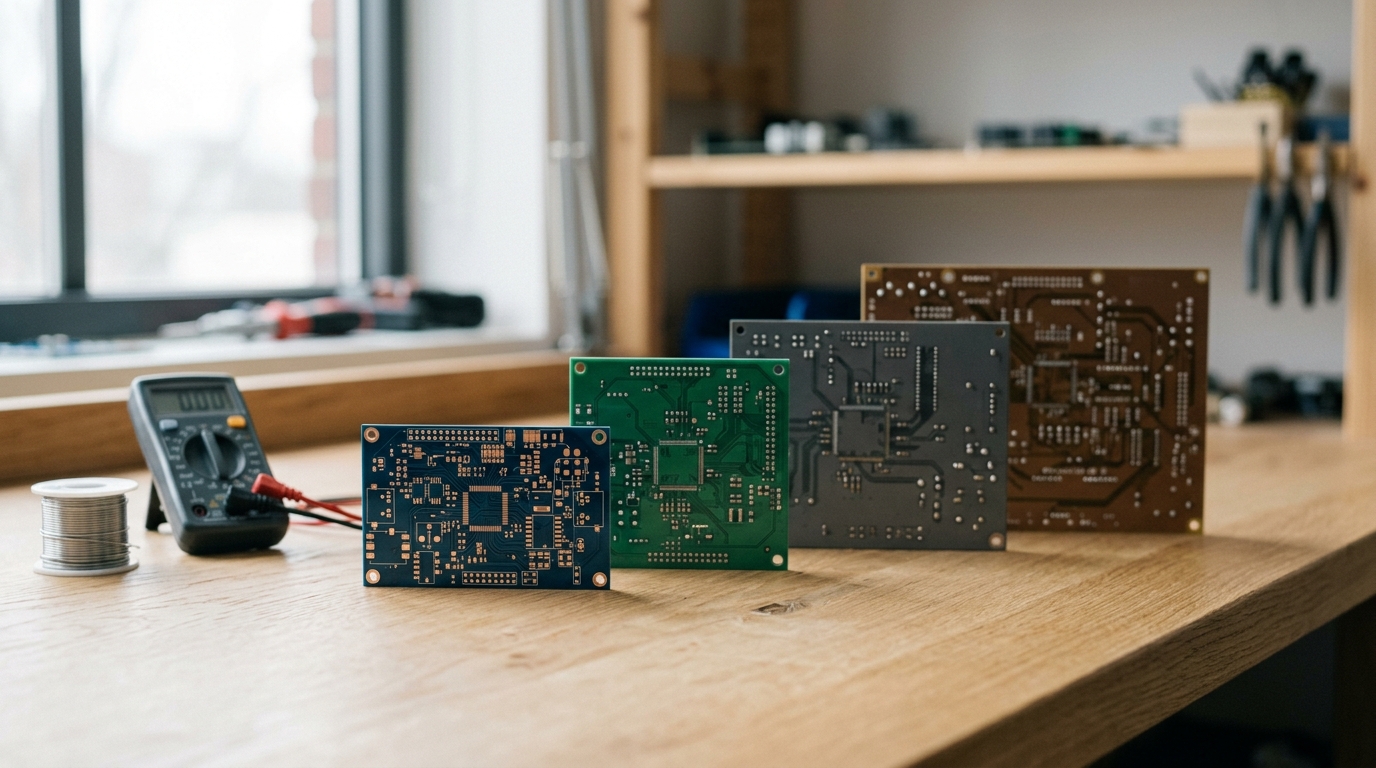
People email me most weeks asking which AI tool will design their circuit board for them. It is a fair question with an annoying answer: none of them do the whole job. Each one automates a different slice, and the slices do not overlap much.
So here is a straight look at the best AI PCB design tools in 2026, what each one actually covers, what it costs today, and where it stops. I build one of the tools on this list. I will say so when I get to it, and I will be specific about what mine cannot do.
The quick answer
- You have a schematic and want the board laid out: Quilter or DeepPCB.
- You want help drafting the schematic itself: ProtoFlow or Flux.
- You want full control and no license cost: KiCad 10.
- You are at a company with an EE team and a budget: Altium, or Cadence Allegro X AI.
- You are not an engineer and you need a working prototype, not a CAD file: Tovan.
If you only read that list, you have most of it. The rest is why.
Getting a prototype takes seven steps, not one
The reason these tools look so different from each other is that "design a PCB" is shorthand for a chain of jobs: work out the requirements, draw the schematic, pick real parts that are actually in stock, place the components, route the copper, run the design checks, then build an enclosure and get the thing fabricated and assembled. Most of the tools below own one or two links in that chain and hand you back a file for the rest.
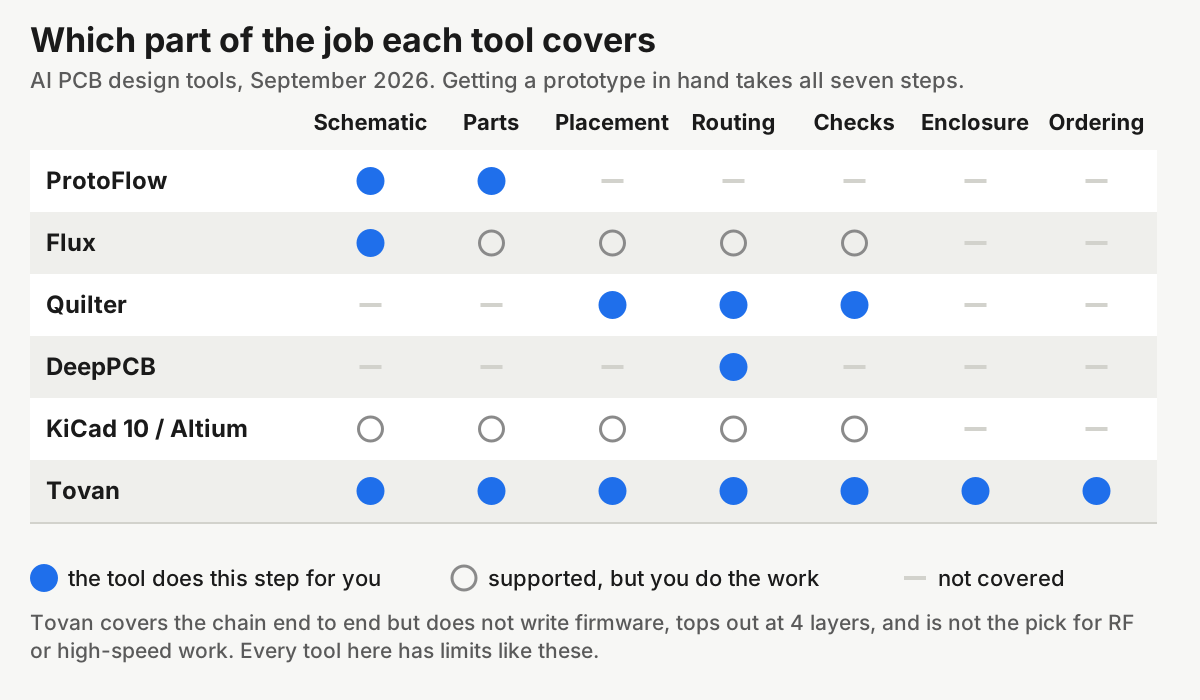
That matrix is the whole argument of this post. A tool that routes beautifully still leaves you holding six other steps.
Schematic capture: ProtoFlow and Flux
This is the step most AI layout tools skip, because they assume you show up with a finished schematic. If you cannot draw one, the routing tools are useless to you.
ProtoFlow is a desktop app where you describe a circuit in plain language and it drafts the schematic, pulls in real supplier parts, and exports to KiCad, Altium, EAGLE, PADS or EDIF. It is free to start, with paid tiers for heavier usage, and your files stay local. If you are an engineer who wants a head start rather than a finished product, this is the least annoying place to begin.
Flux is a full browser-based ECAD tool with an AI copilot sitting next to you. There is a free Explore tier and paid plans that add AI usage, measured in what Flux calls Agent Compute Units. Worth knowing before you plan a budget: Flux does not show the dollar figures on its public pricing page, so you find out what you owe after you sign in. The browser model makes it the easiest of these to use with a teammate.
Both of these keep you in the driver seat. The AI drafts, you edit, you own the file.
Placement and routing: Quilter and DeepPCB
These two take a schematic you already have and turn it into a laid-out board.
Quilter generates candidate layouts and validates them against physics-based constraints, then exports native files back into Altium, Cadence, Siemens or KiCad. Pricing is per project, based on the number of unrouted pins when you upload, with unlimited iterations on the same design and no per-seat license. There is no public rate card, so you are getting a quote.
DeepPCB is narrower and much more legible on price. It routes, and it publishes what that costs: a free 30 minute trial covering one board up to 4 layers, 150 airwires and 100 components, then $30 per hour of AI time, $280 for 10 hours, or $800 for 30. Pay-as-you-go tops out at 8 layers, 1,200 airwires, 1,000 components and 2,200 pins. If you have been fighting the free autorouters bolted onto KiCad, this is the obvious next thing to try.
One caution from experience: a router that fails is usually telling you something about the schematic or the placement, not about itself. I wrote more about that in why your autorouter keeps failing. Throwing a better router at a bad placement mostly gets you a worse board, faster.
The traditional tools are still the traditional tools
KiCad 10 landed on March 20, 2026 with a graphical DRC rule editor, design variants, time-domain track tuning, and importers for Allegro, PADS and gEDA. It is free and open source with no license cost at any scale, and it is still the tool most of these AI products export into. What it will not do is place and route the board for you. That is your afternoon.
Altium is the commercial standard, and it is priced like one. Altium publishes exactly one number openly, $995 per year for each additional Author seat, and quotes the rest. Third-party breakdowns put the base subscription somewhere in the range of $1,495 to $4,500 a year depending on edition and reseller, so treat that as a rough estimate and get a real quote. For large teams, Cadence markets Allegro X AI for generative placement and routing, which is an enterprise purchase, not something you sign up for on a Tuesday.
If you are wondering whether to learn one of these at all, I put my honest take in do you still need to learn KiCad. Short version: it depends on whether you want to be in the loop for revision two.
End to end: Tovan
This is mine, so read it with that in mind. Tovan takes a plain English description of the device, picks and sources real in-stock parts, draws the schematic, lays out and routes the board up to 4 layers, runs the design checks, generates a custom-fit 3D printable enclosure, shows you the whole thing in 3D before you commit, and lets you order it. When the hardware shows up, it writes you a bring-up guide. Free to try, $20 a month for Pro.
The limits matter more than the features. It stops at 4 layers. It is the wrong tool for high-speed digital, RF-heavy designs, or anything headed straight into a certification lab. If your product is a dense, fast board that needs controlled impedance and a pre-compliance plan, hire an EE.
What all of this actually costs
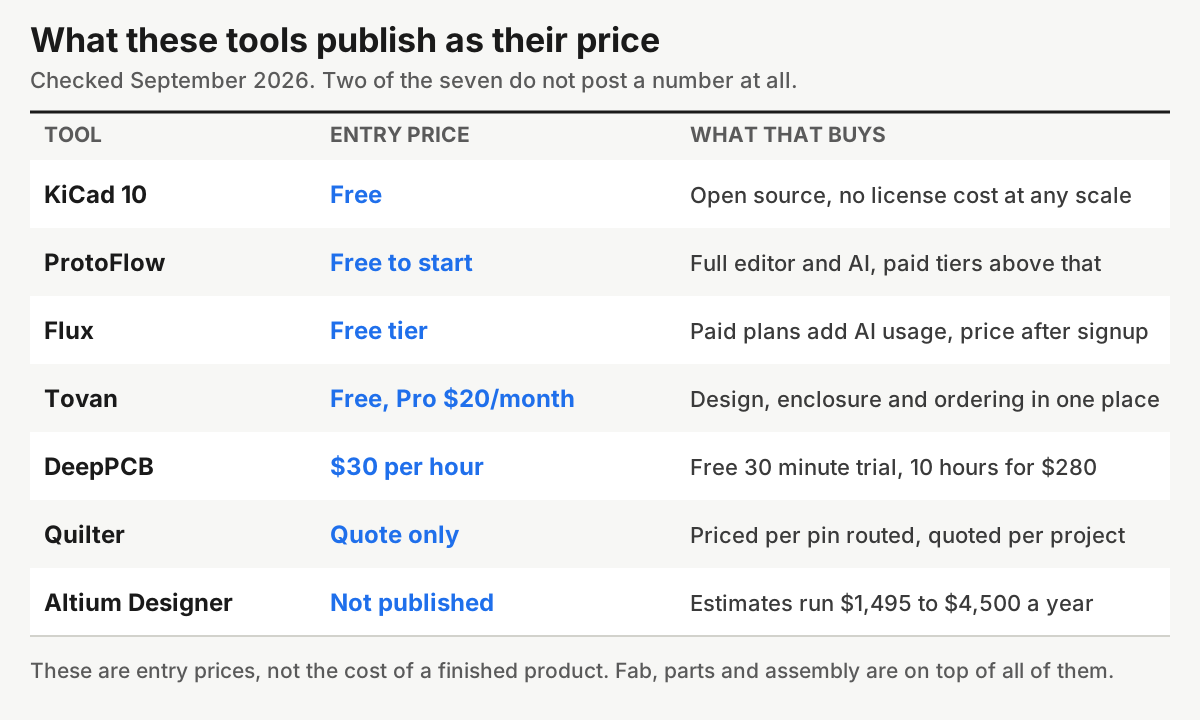
Two things worth noticing. First, the entry price for most of these is zero, so the cost of trying three of them this week is an afternoon, not a budget line. Second, none of these numbers include fabrication, parts or assembly, which is where the real money goes on a first run. If you want those figures, I broke them down in how to make a custom circuit board without being an engineer.
How to choose
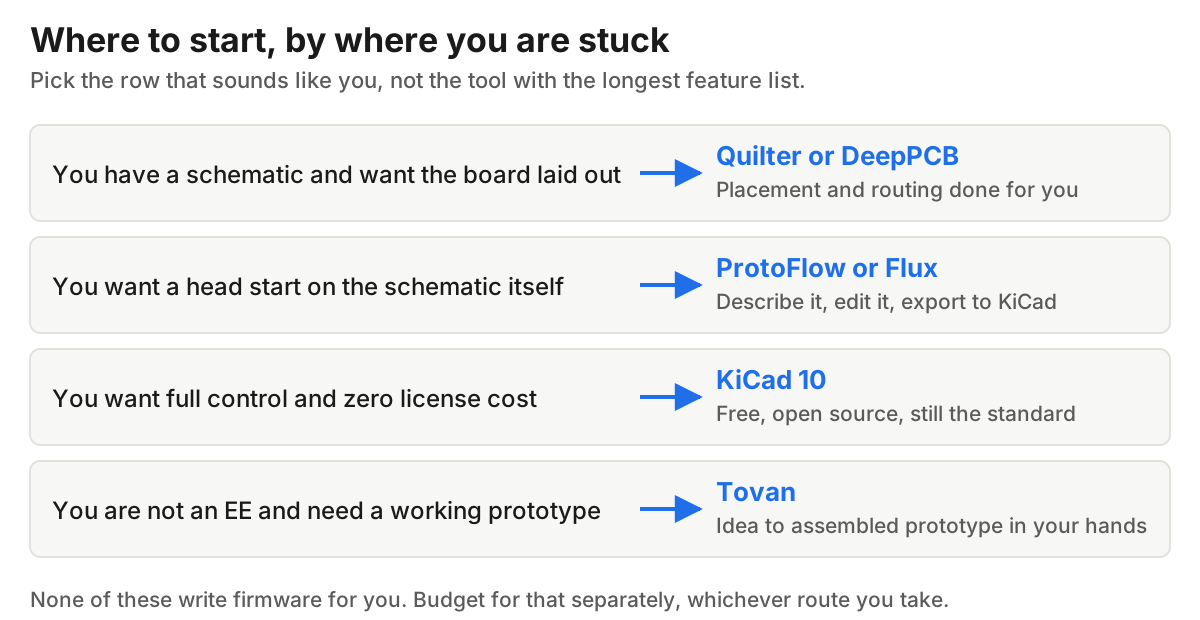
The mistake I see founders make is shopping by feature list. Pick by the step that is blocking you this week. If you cannot get a schematic out of your head, a world-class router does nothing for you. If you have a schematic and forty hours of placement ahead of you, a schematic drafter is the wrong purchase.
What none of them do
Firmware, mostly. Every other tool on this list hands you hardware and stops. Update, October 2026: Tovan now writes and tests firmware for the boards it designs, in beta. Here's how it works. With any other tool, plan for firmware separately, whether that means writing it, using a coding assistant, or paying someone.
They also do not do compliance. No tool here gets you through FCC testing, and none of them will take responsibility when your first run comes back with a footprint mistake. Someone still has to look at the output and think about it, and for a first product that someone is probably you.
FAQ
What is the best AI PCB design tool in 2026?
There is no single best one, because they cover different steps. For routing an existing design, Quilter and DeepPCB. For drafting a schematic, ProtoFlow and Flux. For going from an idea to a prototype you can hold without learning ECAD, Tovan.
Can AI design a PCB from scratch?
Parts of one, reliably. A full design is still a chain of steps, and most tools automate one or two of them. Tools that claim the whole chain, mine included, are best judged on whether the output is manufacturable, not on whether the demo looks fast.
Is there a free AI PCB design tool?
Yes. ProtoFlow and Flux both have free tiers, DeepPCB gives you a free 30 minute trial, KiCad is free forever, and Tovan is free to try. You can test the whole category without paying anything.
Do AI tools replace KiCad or Altium?
Mostly not. Quilter and DeepPCB export back into them on purpose, and ProtoFlow and Flux export to KiCad. They are layers on top of the existing tools more than replacements for them.
Can these tools write my firmware?
One of them does now. Update, October 2026: Tovan writes and tests firmware for the boards it designs, in beta (here's how). With the others, budget time or money for firmware separately, and do it before you order boards, not after.
Are AI-designed boards actually manufacturable?
They can be, if the tool runs real design rule checks against your fab house constraints and sources parts that are in stock. Check both before you order. A board that routes cleanly but uses a part with a 30 week lead time is not a design, it is a drawing.
How many layers can these tools handle?
DeepPCB publishes up to 8 layers on pay-as-you-go. Tovan tops out at 4. KiCad and Altium have no practical ceiling. If you need more than 4 layers, that narrows the list fast.
Try three of them this week. They are mostly free, and an afternoon of poking will tell you more than another month of reading comparison posts, including this one.
0 comments