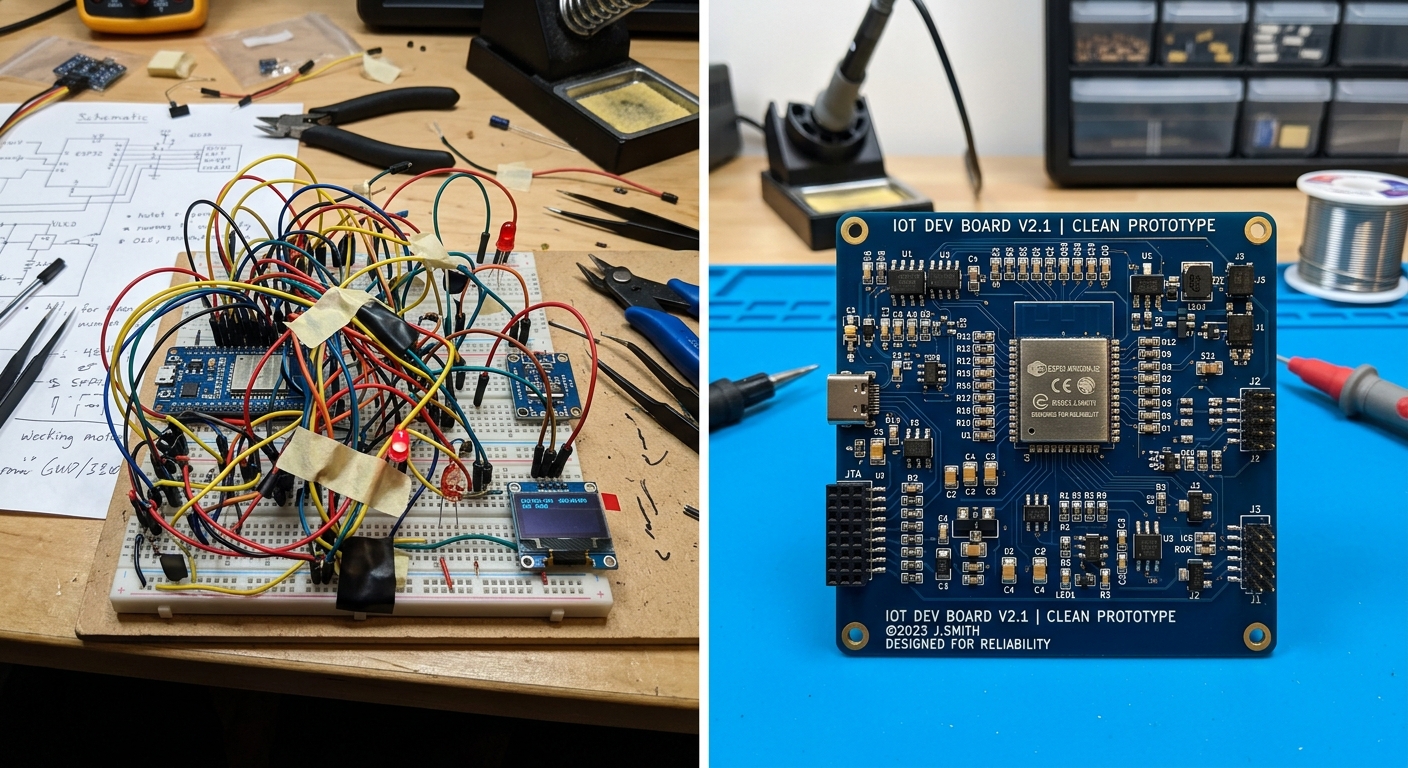
Your prototype works. Maybe it's an Arduino or ESP32 with a sensor module, a little screen, and a rat's nest of jumper wires. It does the thing. And now you want it smaller, cleaner, battery powered, or inside a case that doesn't look like a science fair project.
That means turning your dev board prototype into a custom PCB. This guide walks through how to do it, what actually changes when you leave the dev board behind, and the mistakes that trip up almost everyone on their first try.
Full disclosure: I build Tovan, an AI tool for designing custom boards. I'll mention it where it fits, but everything here applies no matter how you design your board.
New to all this? Start with How to Make a Custom Circuit Board Without Being an Engineer for a full comparison of your options, costs, and timelines.
Are you ready to go custom?
A custom PCB makes sense when:
Your prototype does what you want. The core idea is proven.
The wires are becoming the problem. Things come loose, you can't carry it around, or it won't fit where it needs to go.
You need it smaller or battery powered. Dev boards waste a lot of space and power on stuff you don't use.
You want an enclosure. A clean case around a custom board is way easier than stuffing a dev board and modules into a box.
You want more than one or two. Wiring up ten prototypes by hand gets old fast.
You're probably not ready if you're still changing what the device does every week. Keep iterating on the dev board. It's cheaper and faster to swap a module than to order a new board.
What your dev board is secretly doing for you
This is the part most people miss. A dev board isn't just a microcontroller. It's a microcontroller plus a bunch of supporting circuitry you've never had to think about:
A voltage regulator that turns 5V USB power into the 3.3V your chip needs
A USB to serial chip (or native USB) so you can upload code from your computer
Reset and boot buttons for programming and recovering the chip
A crystal or oscillator that keeps the chip's timing accurate
Decoupling capacitors that keep power clean so the chip doesn't randomly crash
Status LEDs that tell you it's alive
Your sensor modules are the same story. That little breakout board is usually one chip plus a few resistors and capacitors, like pull-up resistors and a regulator.
When you go custom, you have to bring along the parts you need and can drop the parts you don't. That's the whole game.
Step 1: Document your prototype
Before designing anything, write down exactly what you have:
Every board and module, with the exact part name (for example "BME280 temperature sensor breakout," not "the temp sensor")
Every connection: which pin on the dev board goes to which pin on each module
How it's powered: USB, a battery, a wall adapter
What your code uses: which pins, which communication buses (I2C, SPI, UART), WiFi or Bluetooth
Photos of the whole setup from a couple of angles
This becomes the spec for your custom board. It also saves you when you're three weeks in and can't remember whether the display was on pin 4 or 5.
Step 2: Pick how custom you want to go
There are three levels, from easiest to hardest.
Level 1: A carrier board
Keep the dev board, but plug it into a simple custom PCB that replaces the jumper wires. Think of it as a tidy motherboard your dev board and modules snap into.
Pros: The easiest first PCB you can design. Your code doesn't change at all.
Cons: Still bulky and still pays the dev board's power cost. A good stepping stone, not a finish line.
Level 2: A module on a custom board (the sweet spot)
Use the same kind of microcontroller your dev board uses, but as a small pre-built module soldered directly onto your board. For ESP32, that means a module like the ESP32-S3-WROOM, which bundles the chip, flash memory, crystal, and antenna in one tiny metal can.
Pros: Much smaller, cleaner, and more power efficient. Your code carries over with minor pin changes. Pre-certified wireless modules also make radio certification simpler down the road.
Cons: You now have to design power, programming, and support circuits yourself.
For most people going from a prototype to a real device, this is the level to aim for.
Level 3: The bare chip
Put the microcontroller chip itself on your board with all its support parts.
Pros: Smallest and cheapest at high volume.
Cons: Much harder to get right, especially with WiFi or Bluetooth antennas. Save this for later.
Step 3: Turn modules into real parts
Here's a great shortcut: a lot of popular breakout boards are open source hardware. Adafruit and SparkFun publish the schematics and PCB files for many of their boards, including on GitHub. Arduino publishes design files for its boards too.
That means you can open the schematic for the exact module you prototyped with and see precisely which chip, resistors, and capacitors it uses. Copy that circuit onto your board and you're starting from something known to work.
You'll still want to check the main chip's datasheet. Yes, this part is tedious. Datasheets are dense, but the "typical application" circuit near the front is usually what you need.
Step 4: Get power right
Power is where a lot of first custom boards fail. Figure out:
What's feeding it: USB, a lithium battery, AA batteries, or a wall adapter
What voltage each part needs: usually 3.3V for the microcontroller and most sensors
How much current you need at peak: WiFi chips draw big spikes. Espressif's ESP32 schematic checklistrecommends a 3.3V supply that can deliver at least 500 mA.
Battery charging: if you're using a rechargeable lithium battery, you need a proper charger chip. Don't skip this one.
Step 5: Plan for programming and debugging
Your dev board made uploading code effortless. Make sure your custom board does too:
Keep a USB port (many newer chips like the ESP32-S3 have USB built in) or add a programming header
Add reset and boot buttons, or at least pads for them
Add a power LED so you know the board is alive
Add test points on power rails and key signals so you can probe them with a multimeter
These cost pennies and can save you days of head scratching.
Step 6: Design the board
Now you actually lay it out. You've got a few options (all compared in detail in our full guide):
Do it yourself in KiCad or EasyEDA. Free, great community, lots of YouTube tutorials, and a real learning curve. Expect to get it wrong the first time. I did.
Hire a freelancer and hand them the documentation from Step 1. Your notes make their job (and your quote) much easier.
Use Tovan. Describe what your prototype does and which microcontroller it uses. Tovan picks and sources the parts, draws the schematic, lays out and routes the board, and can generate a custom-fit enclosure. You see the board and enclosure in 3D before ordering, order everything through Tovan, and get a bring-up guide for when it arrives. Update, October 2026: it now writes and tests the firmware for the board too, in beta (here's how). And if you stick with the same chip family, your prototype code mostly carries over anyway.
Step 7: Bring it up and port your code
When your boards arrive:
Look them over for obvious solder issues or misplaced parts.
Check for shorts between power and ground with a multimeter before plugging anything in.
Power up carefully, ideally from a current-limited bench supply, and check your voltages.
Upload a simple blink sketch to confirm the chip and programming path work.
Update your pin numbers in your prototype code to match the new board.
Test one feature at a time: sensor, then display, then WiFi, and so on.
AI models like ChatGPT and Claude are really helpful here. Paste in your old code and your new pin mapping, and they can update it for you.
Common mistakes when going from dev board to PCB
No way to program the board. Forgetting USB, a programming header, or boot and reset buttons.
Undersized power supply. A regulator that's fine on paper but can't handle WiFi current spikes, causing random resets.
Copper under the antenna. Wireless modules need a clear keep-out area around the antenna. Put a ground plane or traces under it and your range tanks.
Missing pull-up resistors. Breakout boards often include them for I2C. Your custom board needs them too.
USB-C that doesn't charge. USB-C ports need specific resistors on the CC pins or many chargers won't send power.
Flipped or wrong footprints. A connector or chip placed backwards, or a footprint that doesn't match the part you actually ordered.
No test points. When something doesn't work, you'll wish you could probe it.
Cost and time at a glance
Carrier board
Typical board cost (small run): $5 to $50
Difficulty: Easy
Code changes: None
Module on custom board
Typical board cost (small run): $30 to $150 per round, assembled
Difficulty: Medium
Code changes: Minor pin updates
Bare chip
Typical board cost (small run): $30 to $150+ per round, assembled
Difficulty: Hard
Code changes: Minor to moderate
Ballpark for a handful of simple boards from a low-cost fab before shipping and duties. First designs often need more than one round. Prices checked September 2026.
FAQ
Can I use my Arduino code on a custom PCB?
Usually, yes. If your custom board uses the same microcontroller family as your dev board, most of your code carries over. You'll mainly need to update pin numbers to match your new layout.
Can I just put an Arduino on a PCB?
Yes. The easiest option is a carrier board that your dev board plugs into. For something smaller, use the same microcontroller or a module directly on your board, and copy the support circuitry from the dev board's open source design files.
What's the easiest microcontroller to move from prototype to custom PCB?
Pre-built modules like the ESP32-S3-WROOM are a great choice. They bundle the chip, memory, crystal, and antenna, so you design far less support circuitry yourself.
How much does it cost to turn a prototype into a PCB?
A simple carrier board can cost under $50 for a few boards. A compact custom board with a module and assembled parts is typically $30 to $150 per round for a small batch, plus design time or design fees.
Do I need FCC certification for my custom board?
If you plan to sell a device with WiFi or Bluetooth in the US, it generally needs FCC authorization. Using a pre-certified wireless module can simplify that process, but check the requirements for your specific device before selling it.
Why doesn't my custom board work when my prototype did?
The most common causes are power supply problems, missing support parts the dev board used to provide (like pull-up resistors or boot circuitry), a flipped footprint, or copper under the antenna. Check power first, then work through one feature at a time.
Your dev board got you this far. A custom board is how the idea turns into something real you can hold, carry, and hand to someone else. Document what you've got, pick your level, and go build it.
0 comments